Scheduling and Invoicing Software for Field Service Businesses (2026)
What this guide answers
Many owners ask, “Which appointment scheduling tool should I buy?” A better question is, “How much does the gap between the time I schedule a job and the time I get paid by the customer cost me each week, and which mix of scheduling, dispatch, and invoicing tools will close the biggest part of that gap first?”
This guide explains the operational challenges we encounter in small to mid-sized HVAC, plumbing, electrical, cleaning, and landscaping companies, the problems that scheduling and invoicing software can actually solve, where ROI typically appears first, and an eight-step process for selecting the right platform without outgrowing it within 18 months.
A pattern across small multi-trade operators
Across roughly 40-50 small multi-trade firms we have worked with since 2019, the same problem keeps coming up. Schedule changes, review responses, and invoice generation fall into gaps that no one owns. The lead HVAC technician assumes the plumbing team handles callbacks. The plumbing team assumes the office handles them. Google review notifications are routed to a shared inbox and remain behind dispatch escalations for days. The owner usually notices only when the rebooking rate starts to drop.
We kept seeing the same pattern: an owner running a small multi-trade shop with fewer than 10 technicians covering plumbing, HVAC, and electrical work in a single mid-sized metro area. By the end of the cooling season, more than a dozen one and two-star reviews had accumulated, many raising the same complaint about callbacks related to a particular furnace installation crew. The owner could not distinguish between complaints involving one-off jobs and those affecting repeat business. No one believed responding to reviews was their responsibility. Invoicing had the same problem: technicians finished jobs, paper field tickets piled up on the office desk, and invoices were often entered into QuickBooks two to three days later when someone had time.
The solution did not come from a single feature. The owner initially scheduled 30 minutes every Friday to respond to the previous week’s reviews, assigned each complaint a root-cause discussion during the Monday meeting, and established a billing standard that required technicians to close work orders on their mobile devices before leaving the driveway. The initial plan did not work because Friday afternoons continued to be consumed by emergency communications. In the second month, the review block was moved to Monday at 7:00 a.m., and the process became successful. Mobile invoicing took longer to adopt. The senior HVAC technician pushed back, arguing that closing invoices from the truck slowed progress on the last job.
Over the course of two seasons, review sentiment became more positive, and a few unhappy customers rebooked after receiving personal phone calls. One of them signed up for a maintenance plan. The time between job completion and invoice delivery fell from three days to less than one. The plumbing manager adopted the root-cause tagging process quickly. The senior HVAC technician kept resisting, which is why the owner reviewed those jobs one-on-one rather than during group meetings. The case is a composite based on the most common version of this pattern that we have seen across the small multi-trade companies we have worked with, rather than any one specific shop.
Why this pattern matters in 2026
Across owner conversations on Quora and other contractor-related communities over the past 12 months, the most frequently reported scheduling frustration has remained the same. Small operators begin with Google Calendar, Google Forms, and spreadsheets, but as the number of employees and customers grows, manual data entry begins to break down. They want a single system that records the booking, schedules the job, dispatches it to the right technician, and generates the invoice without requiring data to be entered twice.
Scheduling stopped being just a calendar problem the moment customers began expecting same-day confirmations, live ETAs, and invoices before the technician leaves the job site. The businesses most likely to maintain strong customer retention through 2026 are those that keep scheduling, dispatch, and invoicing in one system rather than three.
Customer expectations have moved online
According to a GetApp survey by Gartner, more than 70% of customers prefer to book appointments online rather than call. In our customer base, the shops that flip on an online booking widget see two changes within the first month: phone volume to the office drops noticeably, and the rebook rate ticks up because returning customers don't have to remember business hours.
Real-time updates are now table stakes
A 2023 Salesforce field service research report found that 94% of customers say service influences their repeat buying decisions, and 88% say the experience a company provides is as important as the product itself. From 14 years of customer conversations, the shops that text a live ETA the morning of the appointment have meaningfully lower cancellation rates than the ones still calling the day before to confirm.
The 15 hours per week dispatchers burn on manual scheduling
Dispatchers in a typical 8-technician operation spend roughly 15 hours per week managing manual schedules: coordinating with technicians by phone, updating paper calendars, handling last-minute reroutes, and reconciling who actually went where. Shops we work with that use drag-and-drop dispatch boards recover most of that time because the schedule updates automatically when a job is delayed. That is the difference between a dispatcher who can answer the phone calmly and one who is constantly two crises behind.
Every service trade has competitors offering the same scope of work. The shops that win the second job from a homeowner are the ones whose dispatch process felt seamless during the first visit.
Windshield time eats 30%+ of the technician day
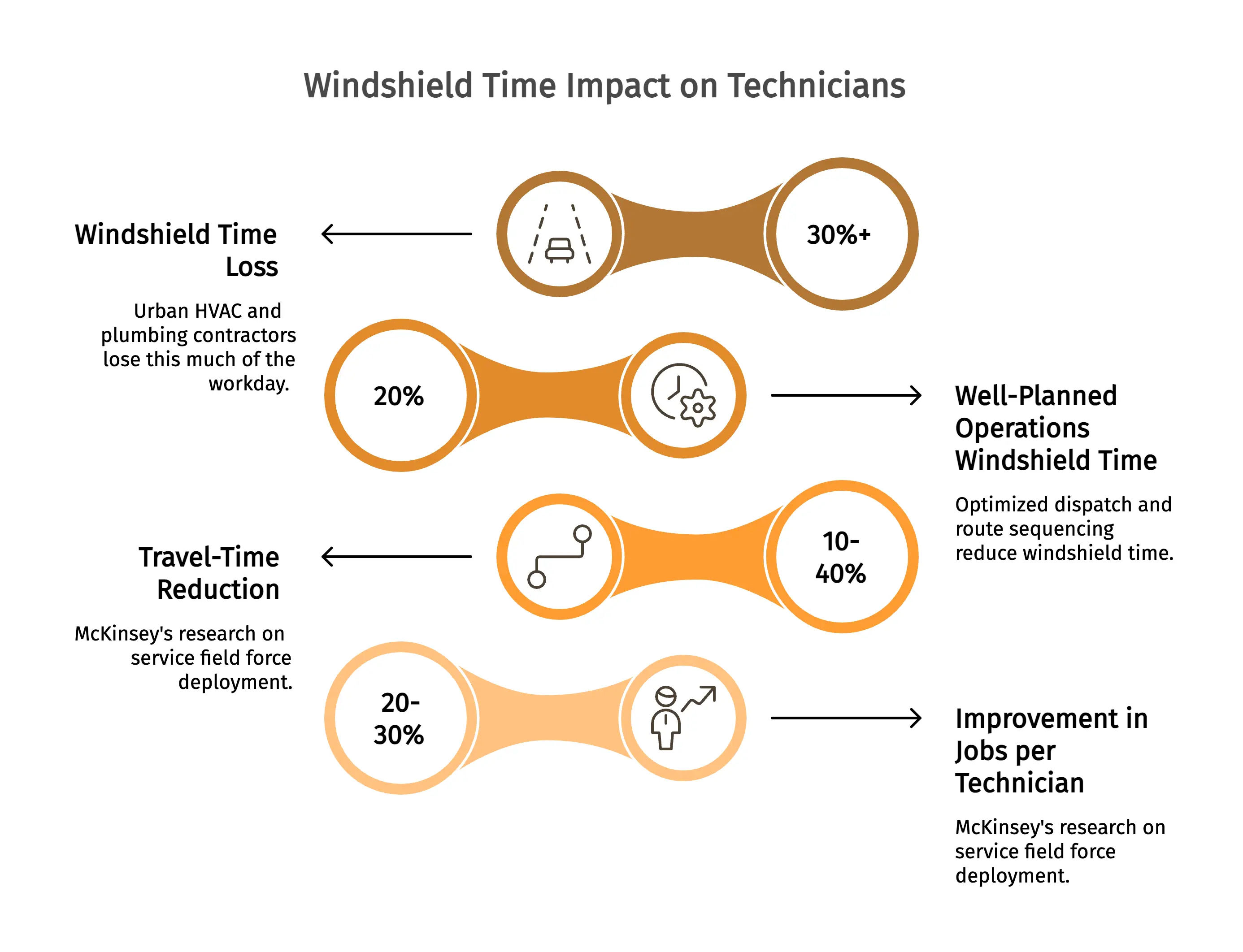
Industry benchmarks indicate that urban HVAC and plumbing contractors regularly lose 30% or more of the workday to windshield time, while well-planned operations reduce that figure to around 20%. In an eight-technician shop, businesses that adopt optimized dispatch and route sequencing can move closer to that 20% benchmark, effectively recovering several billable hours each week.
McKinsey's productivity research on service field force deployment puts the upper bound at 10-40% travel-time reduction with proper routing, and a 20-30% improvement in jobs per technician per day. Shops that pair routing with GPS tracking so the office can see who's closest to the next emergency land toward the higher end. The ones that buy routing but never check the GPS layer mostly stay where they were.
35% of service requests come in after hours
For a typical 5-20 tech shop that relies only on phone calls, service requests left on voicemail after 5:00 p.m. or over the weekend can quietly go to the next available competitor. Owners we have spoken with estimate that roughly a third of service requests come in outside normal business hours. Shops that use an online booking widget can capture those requests before the next business day instead of relying on missed callbacks.
You are not competing for the call you receive. You are competing for the call your competitor never answers.
Arrival windows and the 40% complaint pattern
A large share of complaints about missed appointment windows stem from broad arrival expectations, such as an 8:00 a.m. to 5:00 p.m. service window. Missing a single appointment window in a typical five- to 20-tech operation can cost the business a rebooking opportunity as well as two future referrals from that household. Shops that offer narrow two-hour appointment windows and real-time ETA text notifications consistently achieve higher customer retention.
The HBR retention research is the financial backdrop: improving retention by just 5% can boost profits 25 to 95%. The gating factor on retention isn't pricing or sales scripts - it's whether the customer knew, within 30 minutes, when their tech was actually showing up.
Key features that actually move the needle
There are a few vendor features that matter most to a 5-20 tech shop. These are the features that typically drive ROI within the first six months.
Online customer booking. A booking widget that can be added to your website and Google Business Profile, turning a water heater leak reported at 9:00 p.m. on Sunday into a scheduled job for Monday morning.
A mobile app the techs will actually use. The single biggest predictor of a successful rollout. Not feature count. Not price. Whether the field techs open the mobile app on day three. If they don't, the office goes back to the spreadsheet within a month.
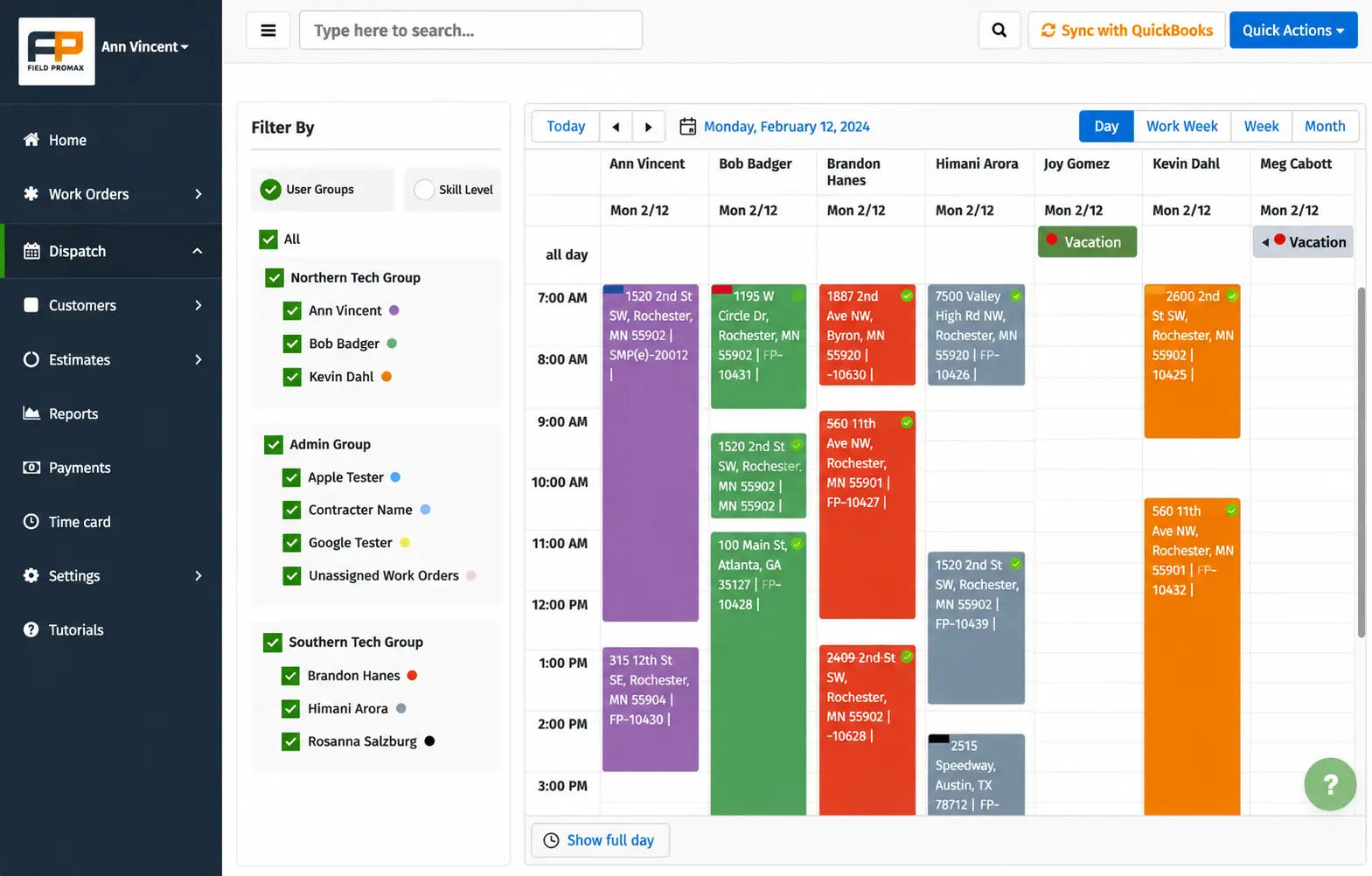
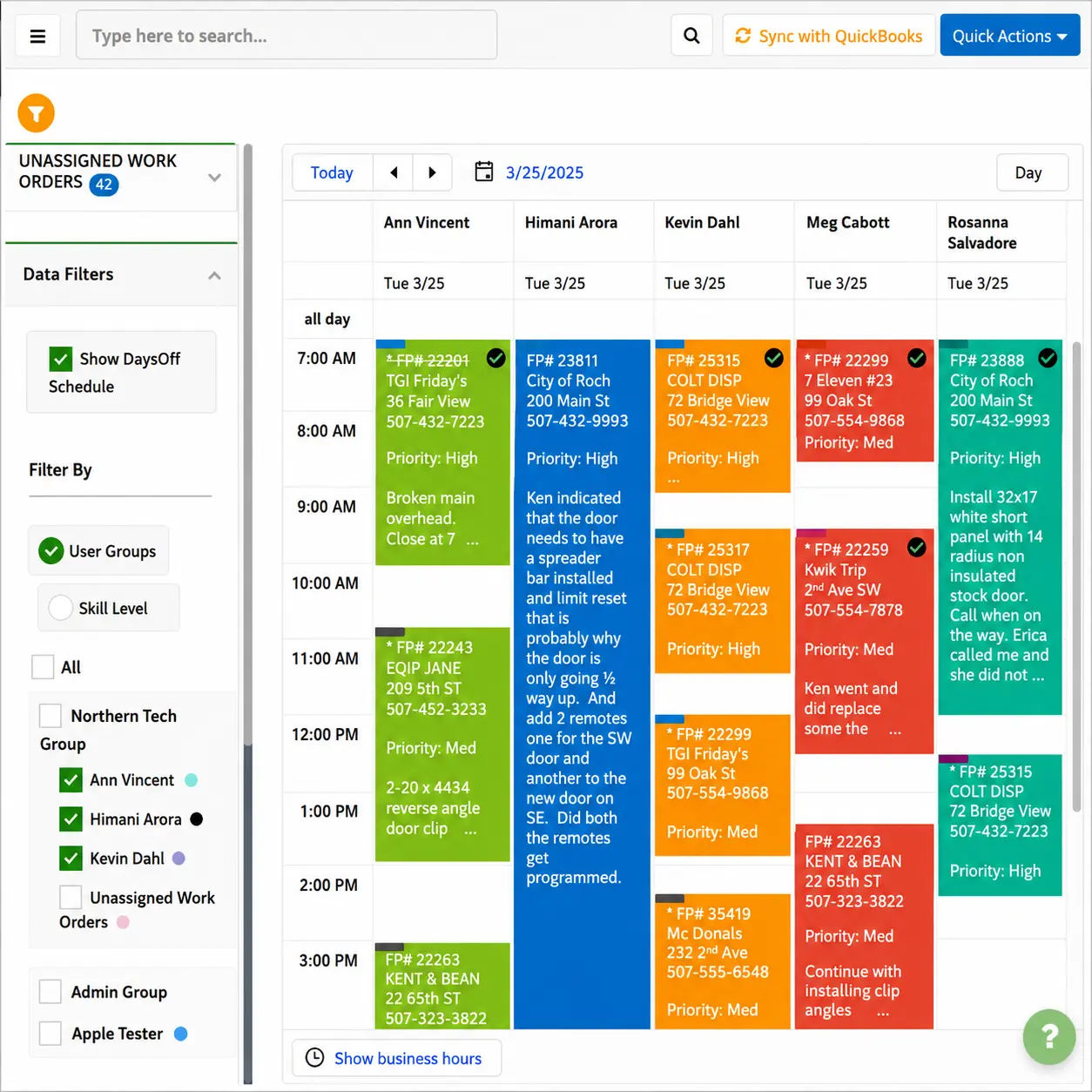
Drag-and-drop dispatch with color coding. Capterra reviewers report that color-coded calendars help them read the day faster. The schedule can be read visually, instead of being read row-by-row.
Tech-created service requests from the field. If a plumber spots a sagging water heater during a drain-cleaning call, they should be able to create an additional service request directly from the truck without going through dispatch.
Calendar sync, automated SMS reminders, and route optimization. SMS notifications are table stakes. If a vendor charges extra for SMS, include that cost in the total evaluation.
Payment integration at job completion. Card-on-file, ACH, or pay-by-link options should allow the customer to pay before the technician leaves the driveway.
How scheduling and invoicing connect: the end-to-end workflow
A scheduling and dispatch tool and an invoicing app only deliver real ROI when they share one record:
- The customer books the service online, or the office records the phone call.
- The dispatcher assigns the job using a drag-and-drop board, color-coded by trade or technician.
- The technician receives the job on a mobile device with the address, scope of work, customer history, and required parts.
- On site, the technician records photos, parts used, labor hours, and the customer's signature.
- After the job is marked complete, the invoice is generated automatically with the work order details attached.
- The customer pays on the spot or through an emailed payment link.
- Payment, parts, and labor sync to QuickBooks without a re-key.
The main gap that has historically impeded cash flow has been between steps 4 and 5. A field service customer from the QuickBooks App Store described how moving from paper-based processes to a paperless system in a short time allowed their teams to work across different locations while enabling the invoice trail to track the progress of the work. The benefit is not just a single feature, but rather the fact that nothing gets lost in the gap between job completion and billing.
From the founder's desk
I read every customer support ticket that comes into Field Promax personally, and the single most common feature request from small shops is tighter dispatch-to-invoice automation. Not better reporting. Not more integrations. Owners want the gap between a tech finishing a job and an invoice hitting the customer's inbox to close to zero. The conventional wisdom is that you need a sophisticated billing engine to do that. You don't.
You need the mobile work order to be the invoice draft, with parts, labor, photos, and signature already attached the moment the tech taps Complete. Most small shops adopting scheduling software for the first time are coming from spreadsheets, paper, or a QuickBooks-only setup, not from a competing platform - which means the bar isn't features, it's whether the office can stop re-keying work orders by Friday.
- Joy Gomez, Founder of Field Promax
Software for small businesses: what actually scales
For a solo electrician, basic online booking and SMS reminders fix the missed-call problem. For a growing HVAC shop with 8 techs and a part-time dispatcher, requirements shift fast: drag-and-drop dispatch, route optimization, QuickBooks integration, mobile work orders, and recurring-maintenance scheduling for service agreements.
The biggest trap small shops fall into is purchasing software for their current needs and then switching to a different platform 14 months later. Scheduling and invoicing software designed for enterprise-level companies often does not account for the unique needs of small-to-mid-sized trade businesses. As a result, many business owners are forced to cycle through multiple tools before finding the right fit. Field Promax was built for this market, covering around two dozen service verticals, with the intention of ensuring that a platform capable of running a 3-tech operation can also support a 25-tech operation without requiring a complete rip-and-replace migration.
Measurable benefits owners report
In reviews across Capterra, G2, and the QuickBooks App Store, the advantages owners consistently highlight tend to fall into a few specific categories:
- Time savings of around 10 hours per week in office admin after replacing paper-based work orders with mobile work orders.
- Simplified team scheduling, making it easier to manage daily calendars as new jobs and technicians are added.
- Faster invoicing after QuickBooks sync eliminates the need for manual re-entry of data.
- Improved technician accountability through timeline-based activity tracking tied directly to work orders.
- Reduced double-booking, dispatch friction, and scheduling delays.
A reviewer on the QuickBooks App Store described Field Promax as making everything easier, from scheduling technicians to invoicing, with special appreciation for the color-coded calendar and the ability for technicians to generate service requests themselves while in the field. This is a feature many customers do not even think to ask for until they have experienced working without it.
Pricing models compared
Three pricing models you will commonly see include:
- Per-user, per-month. The most flexible option. Pay close attention to what features are included at the lower tiers, since SMS routing, advanced reporting, and certain automation features are often restricted.
- Flat monthly fee with user caps. Predictable for shops with a stable team size. This pricing model is usually more cost-effective for shops operating with 8 to 15 technicians compared to per-user pricing.
- Tiered plans with feature gates. Multi-location reporting, advanced analytics, and API access are often limited to the highest pricing tier, making it important to evaluate long-term operational needs before choosing a plan.
Real cost isn't the sticker price. It's sticker plus per-user SMS fees, plus implementation, plus the cost of any feature you need that lives one tier up. Mid-market platforms commonly carry per-tech pricing in the $200-$400 range and implementation fees of $10,000 to $30,000 per a 2026 pricing analysis from QuoteIQ. Small-shop tooling sits well below that. Compare the right band.
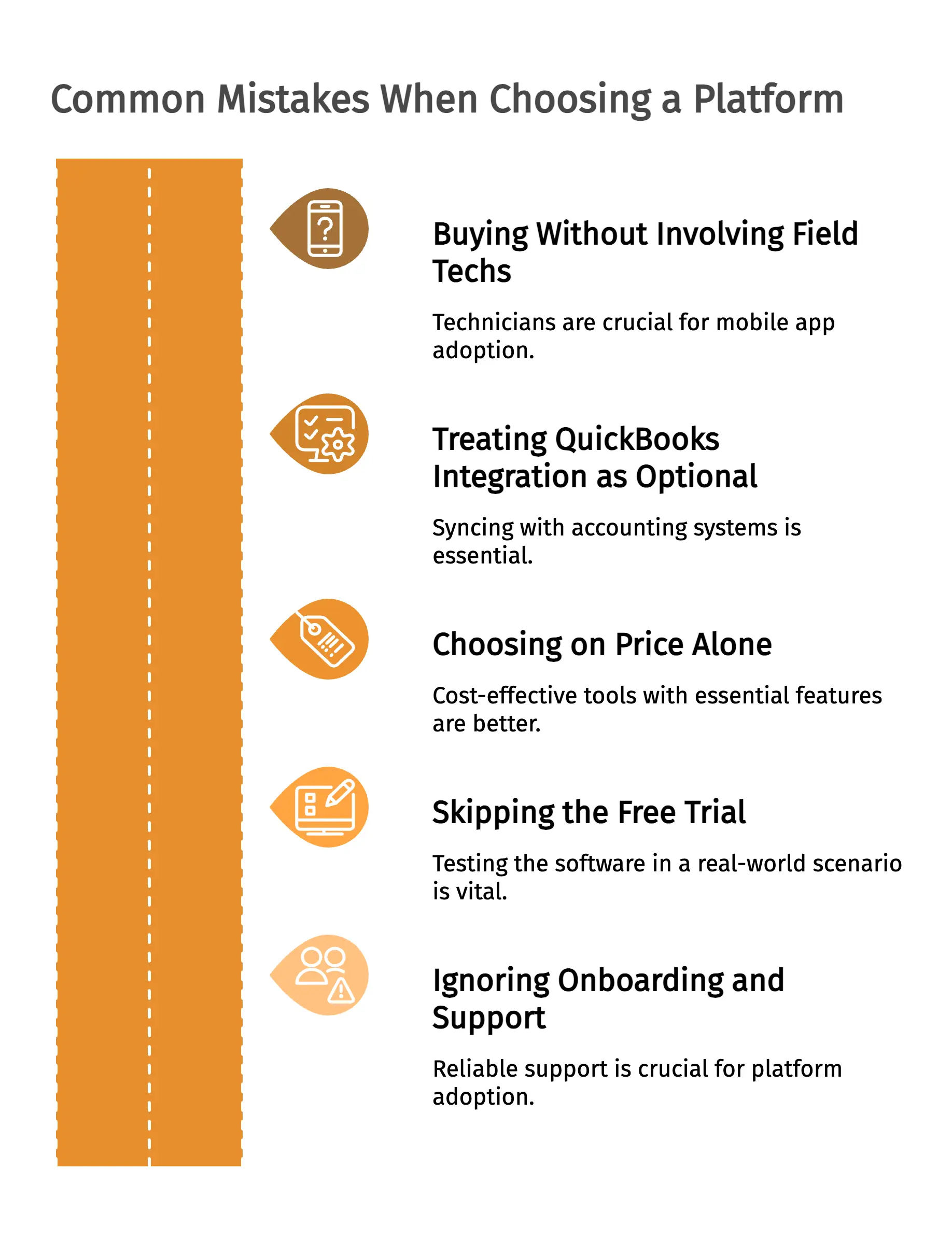
Common mistakes when choosing a platform
-
Buying without involving the field techs. Mobile app adoption by technicians is one of the strongest indicators of a successful software rollout. If techs aren’t convinced by the app’s usability, no amount of office training will fix the problem.
-
Treating QuickBooks integration as optional. If your accounting system runs on QuickBooks but your scheduling software doesn’t sync properly, you’ve essentially created a second job for manual data entry.
-
Choosing on price alone. A tool that costs $19 per month but lacks SMS functionality, route optimization, or QuickBooks integration can become far more expensive over time than a $79 tool that includes all three.
-
Skipping the free trial. Run a full week to test the software in the trial: create an actual job, assign a real technician, and complete a genuine work order from start to finish.
-
Ignoring onboarding and support. If there isn’t reliable support available during those critical first few weeks, chances are you’ll end up abandoning the platform altogether.
An eight-step framework for selecting a platform
-
Write down the top three problems you're solving. Don’t list five. Most shops begin with reducing no-shows, sending invoices on the same day, and stopping double-booking.
-
Map your current job-to-cash cycle in days. Track the timeline from job completion to invoice generation to payment received. This number becomes your baseline.
-
Pull in your dispatcher and two techs for the demo. The dispatcher will tell you whether the app can save their entire week. Techs will tell you whether the app is practical enough to use while working on hot roofs.
-
Shortlist three vendors on Capterra or G2. Read the 3-star reviews more carefully than the 5-star reviews.
-
Run a 14-day trial with real jobs. Not test data.
-
Verify QuickBooks integration end-to-end. Create a real invoice, push it through, and run a P&L check to confirm everything ties out properly.
-
Get total cost of ownership in writing. Factor in per-user charges, SMS fees, implementation costs, training, and pricing for the next service tier.
-
Pick on workflow fit, not feature count. The system that solves the three biggest issues you face will outperform the one that handles 40 features you don’t actually need.
Industry-specific requirements that change the buy
Generic scheduling software doesn't account for trade-specific reality:
- HVAC. Refrigerant handling under EPA Section 608 requires technician certification tracking on the work order and invoice. See HVAC scheduling and invoicing software.
- Plumbing. Emergency calls dominate revenue. Look for a dispatch board that flags urgent jobs and a GPS layer for closest-tech reroute. See plumbing business software.
- Electrical. Commercial work runs on scheduled milestones. Recurring scheduling, job costing, and labor splits on the invoice matter. See electrical contractor software.
- Landscaping and lawn care. Recurring weekly routes. Auto-generated invoices on a maintenance plan plus route sequencing matter more than one-off scheduling. See lawn care software.
- Pest control. Quarterly recurring contracts plus regulatory documentation per visit. The invoice needs chemical, dilution, and treatment area. See pest control software.
- Fire and security. NFPA 72 inspection scheduling is calendar-driven by regulation. The platform must schedule the next inspection automatically when the last one closes. See fire and security software.
If a vendor can’t explain within five minutes how their software handles your trade’s compliance requirements or recurring work patterns, that tells you something important.
Trends shaping scheduling software in 2026
Four shifts worth watching:
- AI-assisted dispatch. Pattern recognition for recurring demand, automatic capacity-fill suggestions, and predicted tech-to-job match scoring. McKinsey's research on gen-AI in aftermarket and field services puts the productivity upside at 10-30% when integrated into dispatch and routing rather than bolted on.
- Voice-driven booking. Customers asking Siri or Google Assistant to book a tune-up. Small but growing, especially for recurring service.
- IoT-triggered service requests. Smart thermostats and connected equipment opening tickets when a fault code trips. HVAC and commercial refrigeration first.
- Live route re-optimization. Schedules that recompute when a job runs long or a new emergency lands. The static morning route is going away.
The ROI math on integrated scheduling and invoicing
The math an 8-tech HVAC or plumbing business typically sees within its first six months:
- Recovered dispatcher time
- Around 15 hours per week are recovered. At a fully loaded labor cost of $25/hour, that translates to roughly $19,500 per year.
- Recovered drive time. Moving from a 30%+ windshield time share to closer to 20% for an 8-tech crew creates the equivalent of one and a half additional technicians’ worth of billable hours per week.
- After-hours capture. Converting even 35% of after-hours service requests into next-morning booked jobs creates measurable revenue gains. Even adding just one additional $400 service ticket per week can generate more than $20,000 annually.
- Faster cash flow. Industry AR research shows electronic invoicing cuts DSO by 6 to 10 days versus paper, and on-site card capture pushes same-day payment rates from ~5% on paper to 50%+ on mobile.
- Retention compound. Tighter arrival windows and live ETAs reduce customer complaints related to missed service windows. Even a 5% improvement in customer retention, based on Harvard Business Review retention economics, becomes one of the strongest revenue levers in the business.
The combined effect dwarfs the subscription cost. The question isn't can a small shop afford this. It's what it costs the shop not to have it. See reports and dashboards for the measurement layer.
Picking the right tool for the next three years
The issue is not about which software offers the most features. It is about which platform can close the gap between paid leads and booked jobs the fastest, while remaining affordable for a growing trade business with 5-20 technicians and a mobile app that technicians will actually use in the field. Field Promax was built specifically for this type of business, combining scheduling and dispatch, mobile invoicing, work orders, and QuickBooks sync within one system, at a price point designed for service businesses that enterprise-focused platforms ignore.
Further reading
.webp?updatedAt=1760512954462)
Conclusion
The shops getting paid the fastest in 2026 aren't the ones with the most features in their software. They're the ones whose scheduling, dispatch, mobile work orders, and invoicing all live in a single record, so nothing falls through the cracks between a technician finishing a job and the customer's payment reaching the bank.
Frequently Asked Questions

Content Creator
Bhargavi Halthore is a content writer at Field Promax, a field service management platform serving trades businesses across the USA and Canada. With over a decade of experience writing for business owners, she brings detailed, ground-level insight to every topic she covers. Her research goes beyond search results - she digs into LinkedIn groups, Facebook communities, and Reddit forums to understand what field service business owners are actually dealing with on the ground. She speaks directly with industry professionals, understands their day-to-day challenges, and translates that into content that is practical and actionable. What you read in her articles reflects real industry patterns, not theory.