Dispatch Software for Field Service Teams
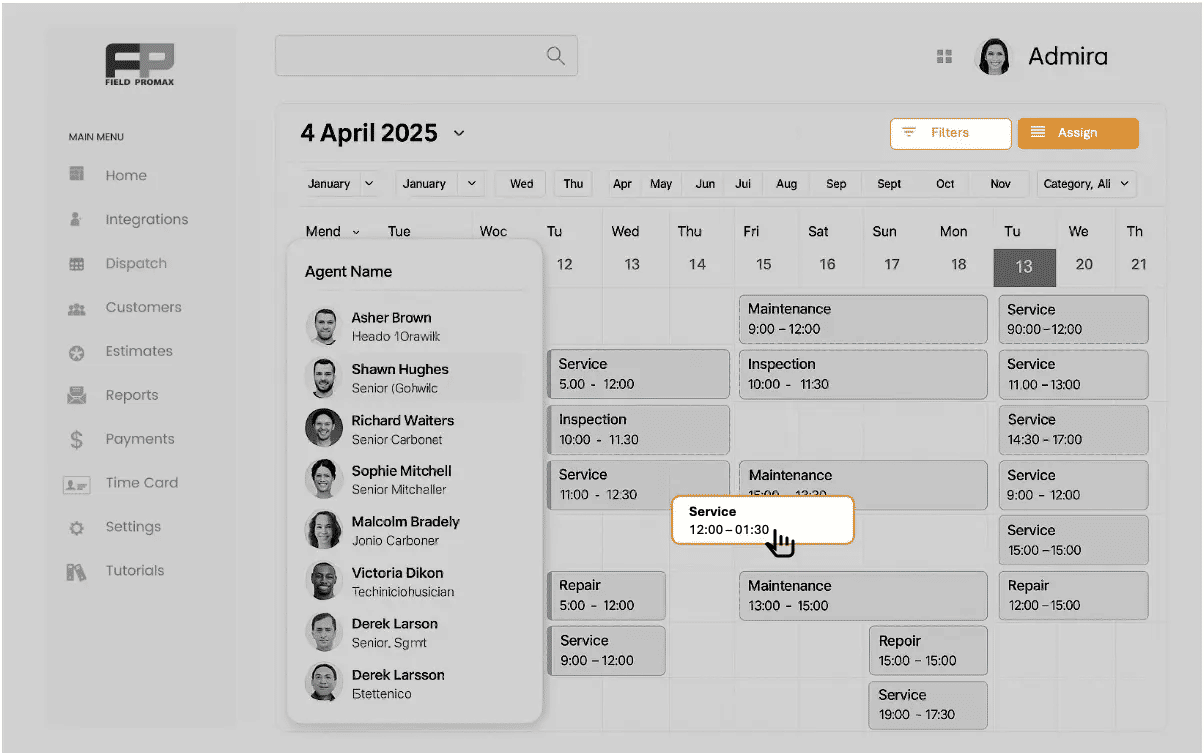
Feeling swamped by too many jobs and unhappy customers?
Our Drag & Drop Scheduling and Dispatch software makes planning easy and visual. Use colorful calendars to track jobs, workers, and progress.
What Is Dispatch Software?
Dispatch software is a digital tool that assigns field service jobs to technicians based on their location, availability, and skill set. It replaces manual scheduling calls and spreadsheets with a real-time system that your whole team can see and act on instantly.
For field service businesses — HVAC, plumbing, electrical, property management, and more — dispatch software is the difference between a technician arriving on time and a customer calling to cancel.
From Job Request to Invoice in 6 Steps
No calls. No spreadsheets. One screen.
Job comes in
Customer call, online booking, or recurring schedule — Field Promax creates a work order instantly.
See your team schedule live
Open the dispatch board. See every assigned job, who is on a task, and what is coming up next — all in one view.
Drag to assign
Drop the job onto the right technician. Calendar updates instantly. No calls needed.
Tech gets notified
Push notification to their phone with job details, customer address, and any notes.
Auto status updates
En route, on site, complete — status updates automatically as the job progresses.
One-click invoice
Finished job converts to invoice in one click. Customer notified. You get paid faster.
Calendar View ~ Route Optimization
Inefficient routing can lead to wasted time and increased fuel costs.
The scheduling and dispatch software includes a map view for visual route optimization, helping reduce travel time and maximize billable hours.
Request Demo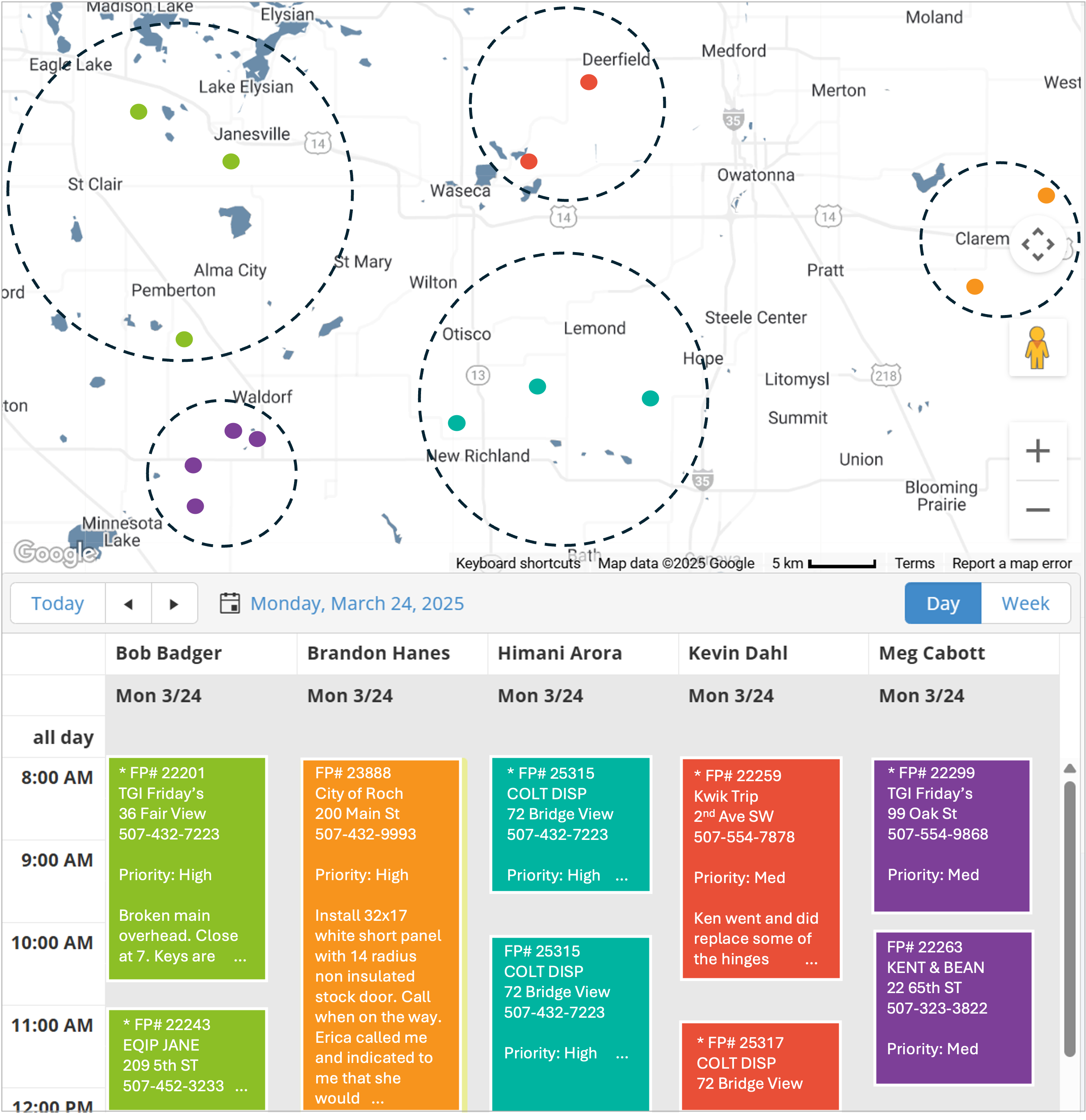
Calendar View ~ Route Optimization
Inefficient routing can lead to wasted time and increased fuel costs.
The scheduling and dispatch software includes a map view for visual route optimization, helping reduce travel time and maximize billable hours.
Request Demo
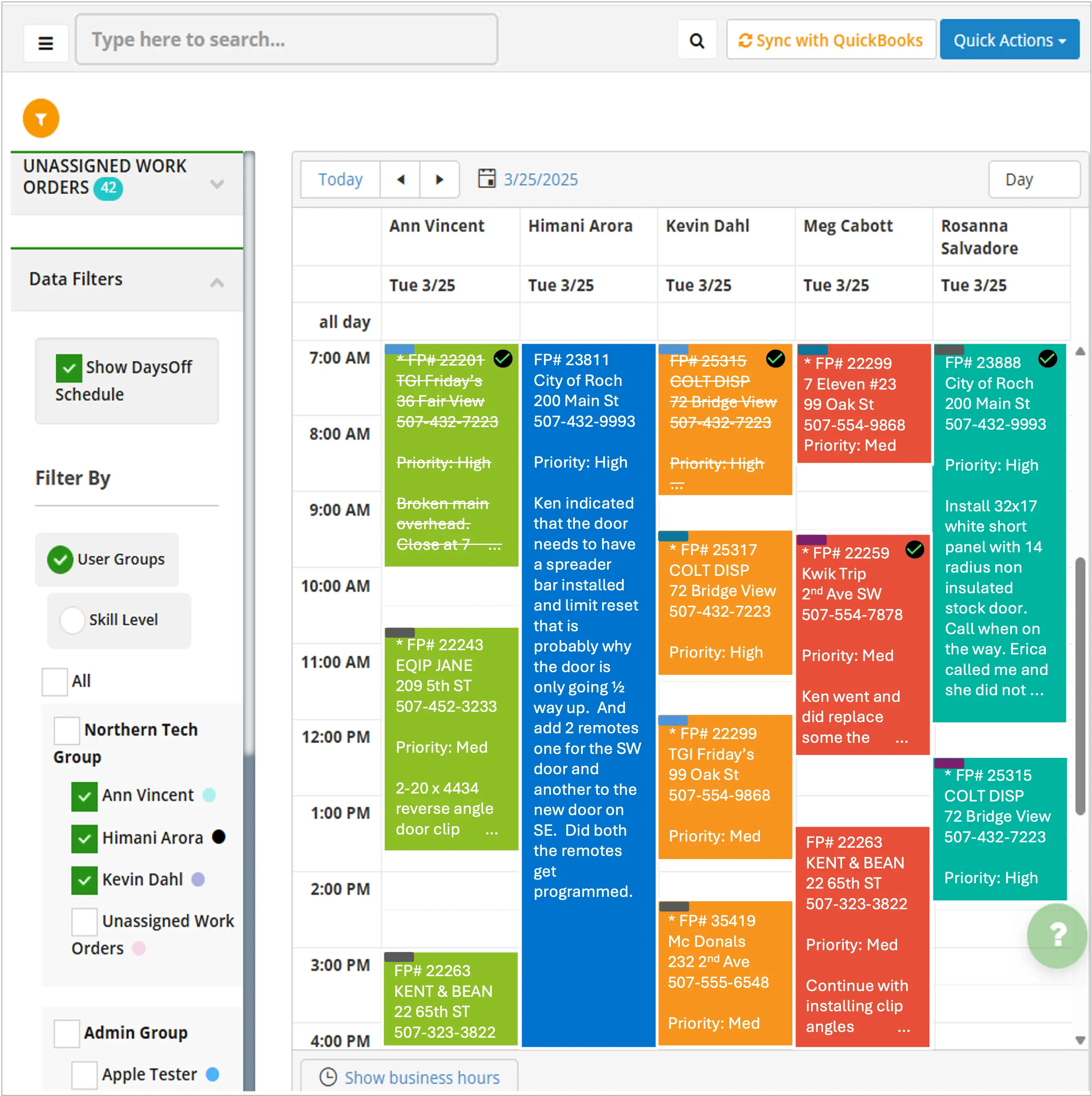
Calendar View ~ Color Coded by Technician
Keeping track of who’s doing what can quickly become overwhelming.
The dispatch software provides a color-coded calendar view, giving you a clear, dynamic perspective of all assignments at a glance.
Request DemoCalendar View ~ Color Coded by Technician
Keeping track of who’s doing what can quickly become overwhelming.
The dispatch software provides a color-coded calendar view, giving you a clear, dynamic perspective of all assignments at a glance.
Request DemoAdvanced Scheduling Features
Our scheduling and dispatching system includes these powerful tools to streamline your operations:
Job Status Calendar
Our service scheduling software features a job status calendar that automatically updates as your team progresses, providing real-time visibility into task completion.
Explore moreDrag and Drop Scheduling
Our scheduling and dispatch software offers an intuitive drag-and-drop interface, allowing you to effortlessly organize your entire team’s schedule with just a few clicks.
Explore moreIntegrated Time-Off
Our dispatch scheduling software incorporates an integrated day-off planner, ensuring work orders align with available resources and respect your team’s time off.
Explore moreCalendar Integration
With Field Promax’s Google Calendar integration, you can sync your work schedule across platforms, ensuring seamless organization and never missing an important deadline.
Explore moreCustomer Notifications
Our Dispatch scheduling software sends automatic updates and text reminders to both customers and techs. You can easily set how many minutes or hours before the visit these reminders are sent, keeping everyone informed and satisfied.
Explore moreCapacity Planning
Visualize team workload to prevent overbooking and ensure you have adequate coverage for expected service demand.
Explore moreHow Field Promax Dispatch Works for Your Industry
HVAC Companies
HVAC teams deal with seasonal demand spikes — 30 to 50 jobs a week in summer. Field Promax lets dispatchers see every technician on the scheduling board, assign emergency AC calls to the first available tech, and send automatic notifications to waiting customers. Recurring maintenance visits populate the schedule automatically.
See Field Promax for HVAC →Plumbing Contractors
Emergency plumbing calls arrive at any hour. Field Promax shows which plumber is finishing their current job soonest so you can assign the next emergency immediately. The tech gets a push notification with the address and job details before they even finish the current call. No phone tag. No delays.
See Field Promax for Plumbing →Electrical Contractors
Multi-tech electrical jobs need coordinated scheduling. Field Promax lets you assign multiple technicians to the same job block, track each one across the day, and adjust the schedule when a job runs long — without disrupting the rest of the day.
See Field Promax for Electrical →Property Management
Maintenance teams handle requests across multiple properties simultaneously. Field Promax gives property managers a single dispatch view across every property, every technician, and every open request — so nothing is missed and no technician is double-booked.
See Field Promax for Property Management →Why Small Service Businesses Choose Field Promax
More users, better value per technician
Field Promax bundles users by plan — 5 users for $199/month, 12 users for $239/month. The more your team grows, the lower your cost per technician. Most competitors charge $49-100 per user with no ceiling.
No training needed
Most customers are dispatching jobs within 24 hours of signing up. If you can use a calendar app, you can use Field Promax.
Mobile-first for your field team
Technicians use a phone app on iOS or Android. No special hardware required. Your techs already have a phone.
QuickBooks sync built in
Completed jobs convert to invoices that sync automatically with QuickBooks. No double entry. No reconciliation headaches.
Why Customers Love Working With Us
What Field Promax customers say.
“Field Promax has changed the way our company does business. We were a paper based company and only got our paperwork from our techs one day a week. Field Promax has given us the capability to invoice our customers quicker, interact with our techs through the app and website seamlessly, and be more efficient with work load and routing jobs. Very very happy with Field Promax!
Tom Lacina
TCorp
“Three years ago, we were a 100% paper-based operation. Field Promax has completely transformed our business. What used to be a logistical nightmare is now a streamlined, tech-driven operation. It has made it possible for us to scale into multiple states - something that was unthinkable before. Compared to other platforms like Salesforce, Field Promax is significantly more affordable without sacrificing functionality or quality.
Tim Yslava
“We have been using Field Promax for a few years now. We are very happy with this program. The features are easy to use and to understand. Customer service is fantastic. I would recommend if someone was considering using this product.
Accounts RWscale
“Field Promax has changed the way our company does business. We were a paper based company and only got our paperwork from our techs one day a week. Field Promax has given us the capability to invoice our customers quicker, interact with our techs through the app and website seamlessly, and be more efficient with work load and routing jobs. Very very happy with Field Promax!
Tom Lacina
TCorp
Frequently Asked Questions
Dispatch software is a digital tool that assigns field service jobs to technicians based on their location, availability, and skill set. It replaces manual scheduling calls with a real-time system that updates automatically as jobs progress.
Scheduling software manages when jobs happen. Dispatch software manages who goes to those jobs and gets them there. Field Promax combines both in one system — you schedule the job and dispatch the technician from the same screen.
Yes. Field Promax is built for field service businesses with 2 to 50 technicians. Plans start at $99/month for 1 user, $199/month for 5 users, and $239/month for 12 users. Most customers are fully set up within 24 hours.
Yes. Field Promax integrates with QuickBooks Online and QuickBooks Desktop. Completed jobs convert to invoices that sync automatically with no double entry.
Yes. Field Promax includes GPS-verified time tracking. Every clock-in, clock-out, and job completion is stamped with the technician GPS location — giving you an accurate, verified record of where your team was and when, linked directly to work orders.
Field Promax offers three plans: Light at $99/month for 1 user, Standard at $199/month for 5 users, and Premium at $239/month for 12 users. The more your team grows, the lower the cost per technician. See full details at fieldpromax.com/pricing.
Field Promax serves HVAC, plumbing, electrical, pest control, carpet cleaning, property management, landscaping, garage door, fire and security, roofing, painting, and chimney sweep companies across the US and Canada.
Most customers complete setup in under 24 hours. Onboarding includes importing your team, setting up your service area, and configuring notifications. No technical setup required.