Pest Control Business Software

Pest Control Software for Recurring Routes and Treatment Records
Field Promax runs your monthly and quarterly pest control plans as recurring work orders, puts each technician's stops in the best driving order with Optimize Routes, and texts the customer when the tech is on the way. On site, technicians record the products they applied and the areas they treated on a checklist built for that service, add photos and get the customer's signature. Then they bill on the spot, and the invoice goes to QuickBooks or Xero without retyping.
Trusted by 100,000+ contractors. Rated 4.7 on Google and 4.2 on Capterra.
Streamline Your Pest Control Operations
Pest Control Scheduling Software
Book Recurring Service in a Few Clicks
Book one-time calls and monthly or quarterly service plans on one calendar. Drag a job to another day or technician, and the change shows up on the tech's phone.
- Drag & Drop Scheduling
- Recurring Service Plans
- Calendar View
- Mobile Job Access

Pest Control Routing Software
Smarter Routes, Less Time on the Road
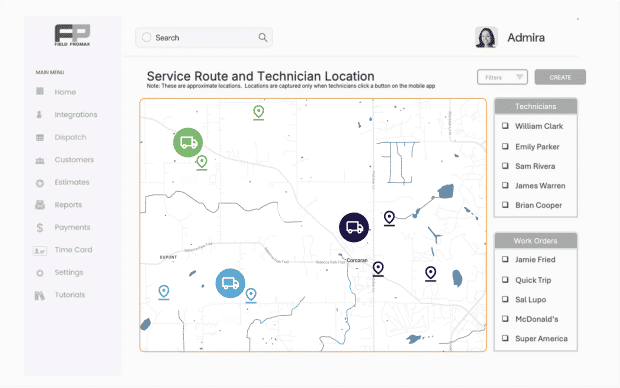
Optimize Routes puts each technician's stops for the day in a shorter driving order and shows the miles and drive time, without changing the scheduled times.
- Route Optimization
- Jobs on a Map
- GPS Check-In Stamps
- Technician Day History
More tools for pest control businesses
Pest Control Invoicing Software
Get Paid Without Chasing Invoices
The work order is the invoice, so the products used and the customer's signature are already on it. Technicians can take a card payment on site or email a payment link before they drive off.
Pest Control Reporting Software
See What’s Working and What’s Not
Get clear reports on job status, technician performance, revenue, and customer history. Know your numbers and plan your next route with facts.
Pest Control Software for QuickBooks
No Retyping Invoices Into QuickBooks
Field Promax works with QuickBooks Online and Desktop. Customers, products, invoices, payments and expenses sync, so finished jobs reach your books without retyping.
Pest Control Software FAQs
Pest control software runs the business side of a pest control company in one place: recurring service plans, scheduling and routes, treatment notes, photos and signatures from the field, and invoicing. Field Promax gives the office a dispatch calendar and gives technicians a mobile app, so the job is booked, done, recorded and billed without paper. Most companies are set up within an hour.
Yes. Build a checklist for each service type, such as quarterly general pest or termite treatment, with fields for the product name, EPA registration number, amount applied, target pest and area treated. Every new work order you create of that job type carries the checklist, and the technician fills it in on the phone. The office can download the checklist answers as a PDF or email them to the customer. Products can also be added to the work order with a quantity. Field Promax keeps these records; it does not file state pesticide reports for you.
Yes. Create a recurrence for the customer, pick the service type, then set the pattern: weekly, monthly or yearly, for example on day 1 of every 3 months for quarterly service. Choose the technician and time window, and an end date or number of visits. Field Promax creates each work order 7 days ahead, so dispatch always sees the coming week.
Optimize Routes takes each technician's stops for the day and puts them in a shorter driving order, then shows numbered stops, total miles and drive time. It does not change the scheduled times, and you can save the plan for each technician and date. The dispatch map shows every job, so you can see which stops sit close together.
Yes. Your customers can log in to the Field Promax customer portal to see their upcoming appointments and their balance, approve estimates and send you a service request, for example when they spot ants between quarterly visits. Requests reach your office, so you can book the extra visit.
Yes. Technicians see their jobs on a calendar and map, check in on arrival, add the products they used, take before and after photos, get the customer's signature on the phone and collect a card payment before they leave. If a basement or crawl space has no signal, they can download the day's jobs first and sync later.
Yes. You can turn on texts that tell the customer when a visit is booked, remind them before the visit and send an On My Way text when the technician taps In Route. You write the messages once in Settings. That helps for interior treatments, where someone has to be home and pets put away. Customers can reply STOP to opt out.
Yes, with QuickBooks Online, QuickBooks Desktop or Xero, one at a time. With QuickBooks, customers, products, invoices, payments and expenses sync, so when a job is done the invoice reaches your books with the line items filled in and nothing is typed twice.
Yes. Build the estimate from your own price list, for example a termite treatment, an initial cleanout or a yearly plan, and add photos of the problem. The customer approves and signs online, and one click turns the approved estimate into a work order with every line item carried over. Technicians can also write estimates on site in the mobile app.
Field Promax plans start at $99 per month, billed annually. See plans and pricing.

Save More Time and Boost Productivity
Your team is the driving force behind your success. Support them with the right tools and watch your business thrive.